 MailDirect Help
Add Questions - From Previous Survey
Add Questions - From Previous Survey
- Mail Direct displays the Get Questions from Previous Survey screen.
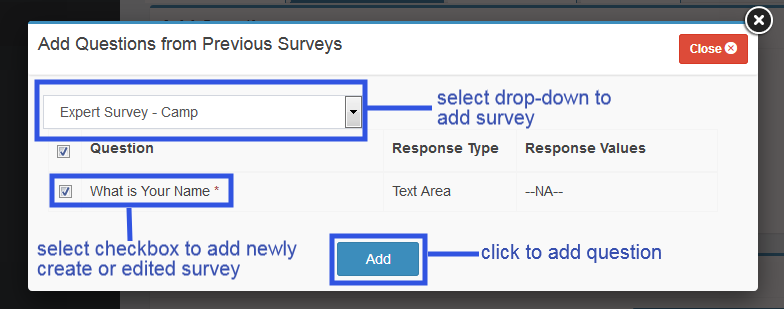
Figure : Get Questions from Previous Survey
Table : Get Questions from Previous Survey
|
Field |
Description |
|
Select |
Select an appropriate survey from the drop - down list. This field is mandatory. |
|
Select Questions |
Select the check boxes corresponding to the appropriate question/s to be added to the survey. This field is not mandatory. |
- Mail Direct displays after added from previously created survey's question screen.
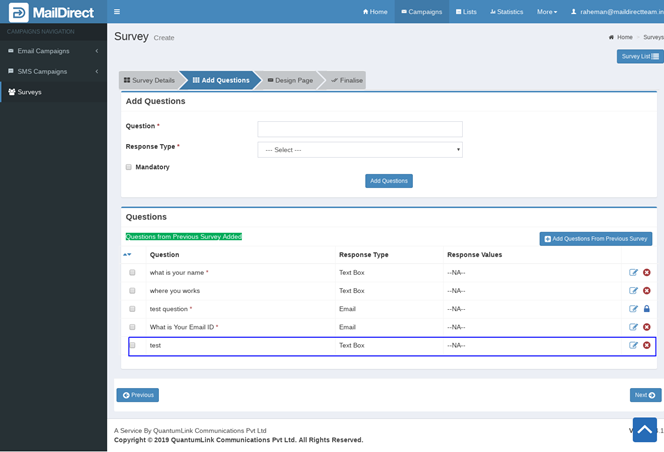
Figure : Display Questions after add from Previous Survey
Note: Only one question can be added at a time the user can click either of the following:
- Add Questions button to add more new questions
- Previous Surveys link to add questions from a previous survey
- To edit a question added on the Survey Questions screen, the user can click the Edit link for the corresponding question.
- Mail Direct displays the Add/Edit Question screen with the details for the corresponding question. Edit the details in the required fields.
- Mail Direct displays the added Questions detail screen.

Figure : Details of Question Created/Added
Table : Details of Question Created/Added
|
Field |
Description |
|
Question |
Displays Question |
|
Response type |
Displays Response Type |
|
Response Values |
Displays Response Value |
|
|
Using this button to edit existing question as shown in figure click on edit button to update changes made in question/s |
|
|
Using this button to delete existing question as shown in figure |

