 MailDirect Help
Creating New SMS Campaign
Creating New SMS Campaign
This section provides instructions on how to create a SMS campaign and view statistics summary.
Also this section provides instructions on how to create quick SMS campaigns and create campaigns using the wizard.
- To create a SMS Campaign using Wizard:
- On the SMS Campaign Home page Click Create New Campaign link.
- Mail Direct displays the Create New SMS Campaign screen.
SMS Campaign Wizard – Provide Title
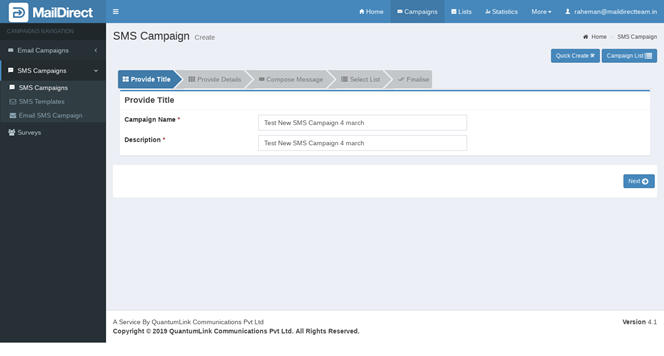
Figure : Create New SMS Campaign-Provide Title
Table : Create New SMS Campaign-Provide Title
|
Field |
Description |
|
Campaign Name |
Type an appropriate name for the campaign This field is mandatory |
|
Description |
Type an appropriate description for the campaign This field is mandatory |
Click on  next button