 MailDirect Help
Monthly Campaign Wizard – Map Emails
Monthly Campaign Wizard – Map Emails
- MailDirect displays the Monthly Campaign Wizard Email List Map screen
- The
 Edit and
  View button provided for email mapped, to edit and view for selected emails.
 - When click on
 View button it will displays two options Email Preview and Email Details.
 - On clicking of Email Preview link, displays preview of Email message.
- On clicking of Email Details link, displays Email Details page where User can View and Edit Email Information.
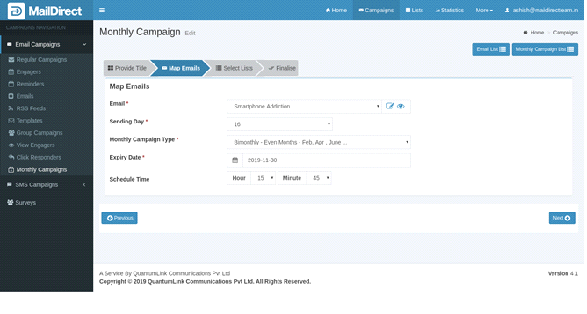
Figure : Create New Monthly Campaign - Map Emails
Table : Create New Monthly Campaign - Map Emails
|
Field |
Description |
|
Email To Map |
Select the drop-down to map the Email to the Monthly Campaign. The campaign will be sent the email contents to the recipients. |
|
Sending Day |
On Selecting Sending Day, it will respond on months of selected day. For Monthly Campaign. |
|
Monthly Campaign Type |
This section displays drop - down of Monthly Campaign type to be selected. Monthly – Sends Monthly Campaign every month from sending days and Up to Expiry Date selected. Fort Nightly – Send Monthly Campaign every 15 day of month from sending days and Up to Expiry Date selected. Bimonthly - Odd Months - (Jan, Mar, May ...) – send Monthly Campaign every two month Odd Months - (Jan, Mar, May ...) from sending days and Up to Expiry Date selected. Bimonthly - Even Months - (Feb, April, June ...) – send Monthly Campaign every two month Even Months - (Feb, April, June ...) from sending days and Up to Expiry Date selected. |
|
Expiry Date |
This section displays expiry date for Monthly Campaign created. |
|
Schedule Time |
The Monthly Campaign can be scheduled on desired time by selecting schedule time i.e. Hour and Minutes. |
Select/fill the appropriate details in the required fields. Click on  next button