 MailDirect Help
Preview – RSS Feed Details
Preview – RSS Feed Details
To preview a rssfeed details using the View button in home page:
- Click the View button
 at Rssfeed Home Page to view created rssfeed details.
 - Mail Direct displays the Rssfeed Details screen.
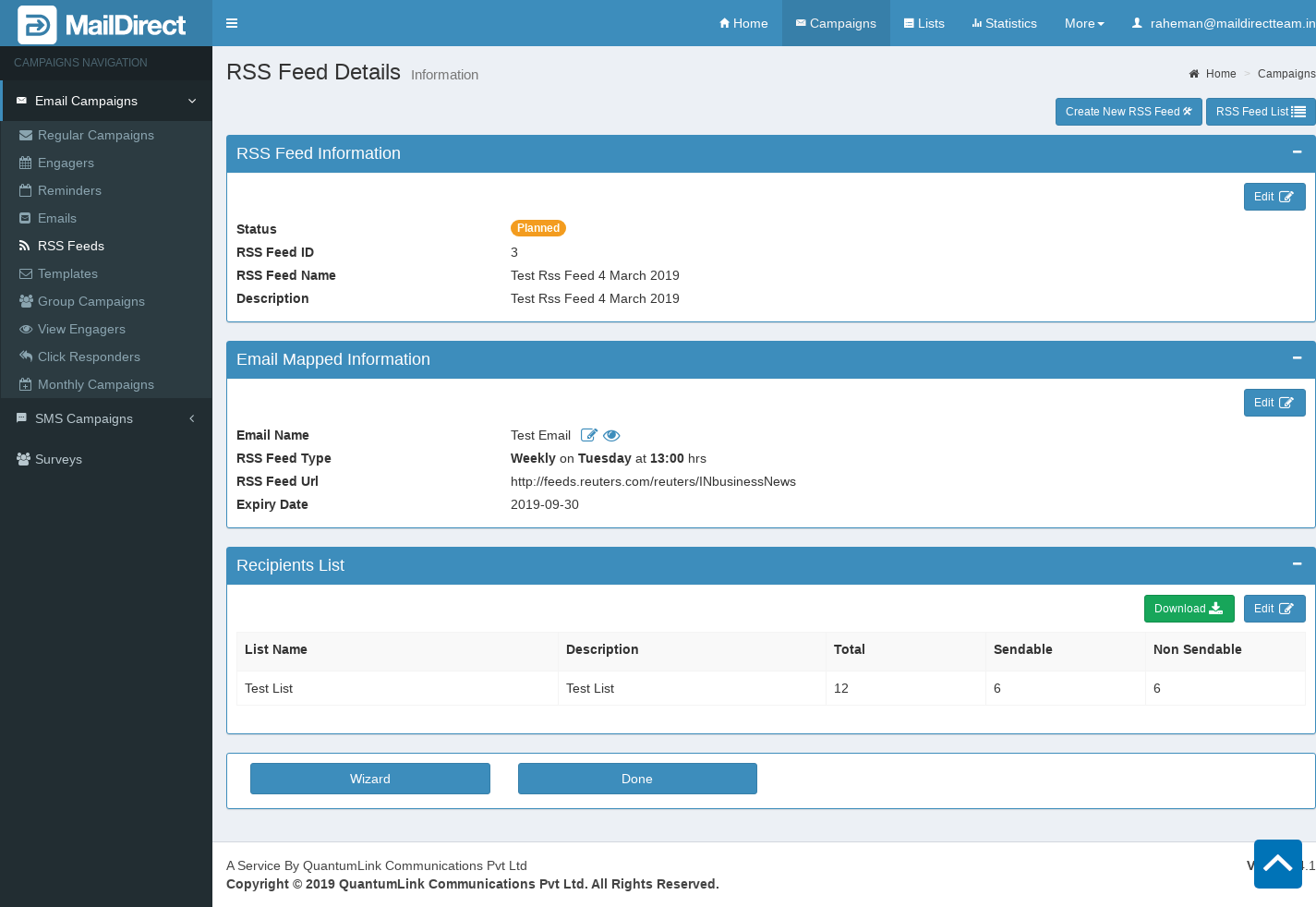
Figure : Preview Rssfeed Details
RSS Feed Information:
This section displays RSS Feed Status, RSS Feed ID, RSS Feed Name and Description. When click on edit button it will displays wizard page where user can edit RSS Feed information like RSS Feed name and description.
Email Mapped Information:
This section displays Email Mapped details to RSS Feed.
This displays Email Name with Edit link and Preview Button,RSS Feed Url, RSS Feed Type and Expiry Date.
When click on edit button it will displays RSS Feed wizard page where user can edit email mapped information RSS Feed Url, RSS Feed type and expiry date.
Email can be edited by clicking the  Edit button.
On clicking  View button it will displays two options Email Preview and Email Details.
On clicking of Email Preview link, displays preview of email message.
On clicking of Email Details link, displays Email Details page where User can View and Edit Email Information
Recipients List:
This section displays information regarding list mapped to RSS Feed. List Details includes List Name,Description,total recipients, sendable recipients and non sendable. Download recipient with/without Custom field. When click on edit button it will displays wizard page where user can edit list mapped information.
Table : Preview Campaign Links/ buttons Details
|
Field |
Description |
|
|
|
|
Click this icon corresponding to the appropriate section to edit the information displayed in that section. |
|
|
|
|
Click this icon corresponding to the appropriate section to download the information displayed in that section. |
|
|
|
|
Click this button to edit the rssfeed that is currently being viewed. Note: The user can edit the entire rssfeed. |
|
|
|
|
Click this button to return to home page of rssfeed |
|
|


- Click the appropriate icons/buttons as required.