 MailDirect Help
Reminder Wizard – Provide Map Email
Reminder Wizard – Provide Map Email
- MailDirect displays the Reminder Campaign Wizard Email List Map screen.
- The
 Edit and
  View button provided for email mapped, to edit and view for selected emails.
 - When click on
 View button it will displays two options Email Preview and Email Details.
 - On clicking of Email Preview link, displays preview of Email message.
- On clicking of Email Details link, displays Email Details page where User can View and Edit Email Information.
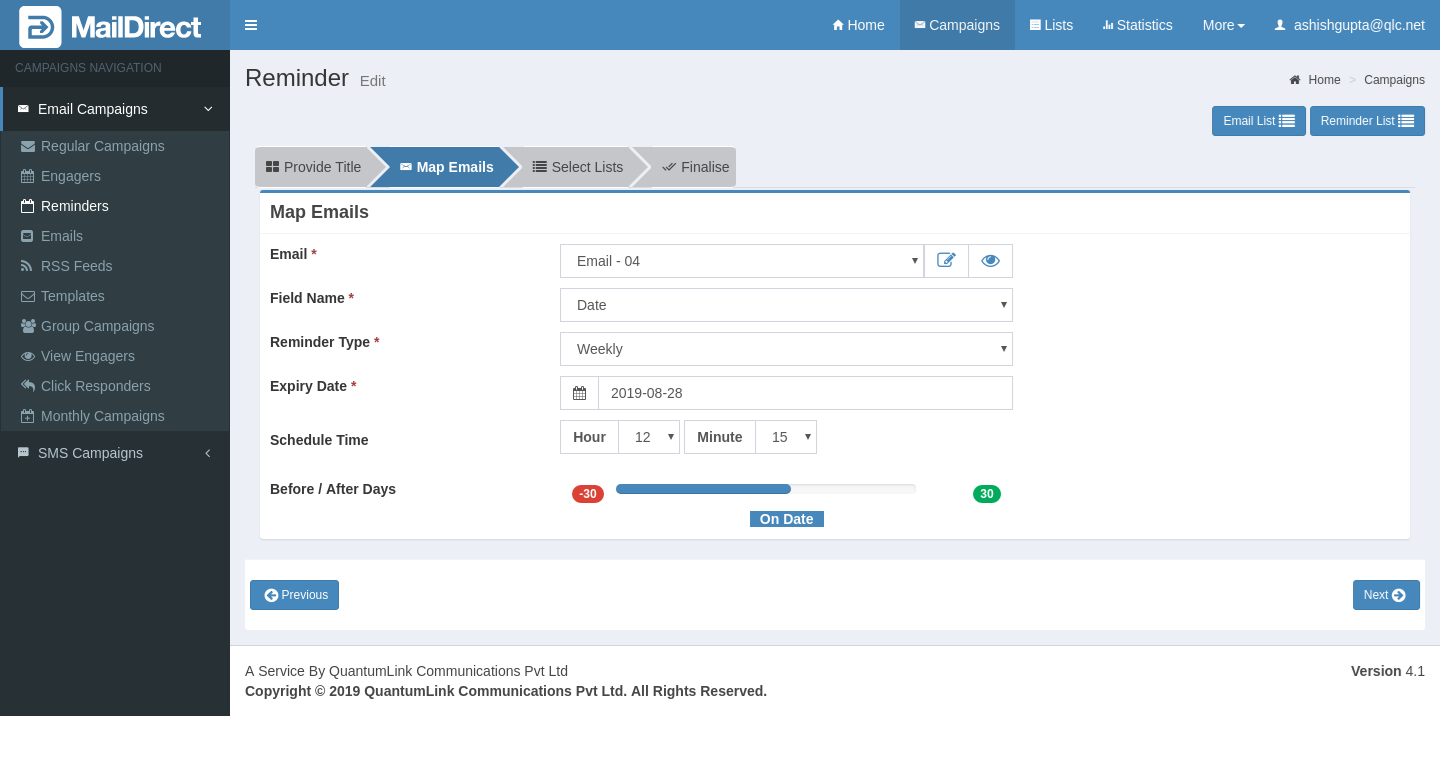
Figure : Create New Reminder-Map Emails
Table : Map Emails
|
Field |
Description |
|
|
This section displays drop down field of the email campaign list to be select. |
|
Field name |
This section displays drop down (date) field name to be selected. |
|
Reminder Type |
This section displays drop - down of reminder type to be selected. Annual – send reminder once in year from date selected. Half Yearly – send reminder twice in year (Half year) from date selected. Quarterly – send reminder every three month from date selected. Bi monthly – send reminder every two month from date selected. Monthly – send reminder every month from date selected. Fort nightly – send reminder every 15 day from date selected. Weekly – send reminder every week from date selected. |
|
Schedule Time |
This field allows to set schedule time for reminder created. |
|
Before / After Days |
The slider allows to set the execution day – On Date, Before Date or After Date. |
|
Expiry Date |
This section displays expiry date for reminder created. |
- Select/fill the appropriate details in the required fields.
- Click on
 next button