 MailDirect Help
Campaign Wizard - Provide Details
Campaign Wizard - Provide Details
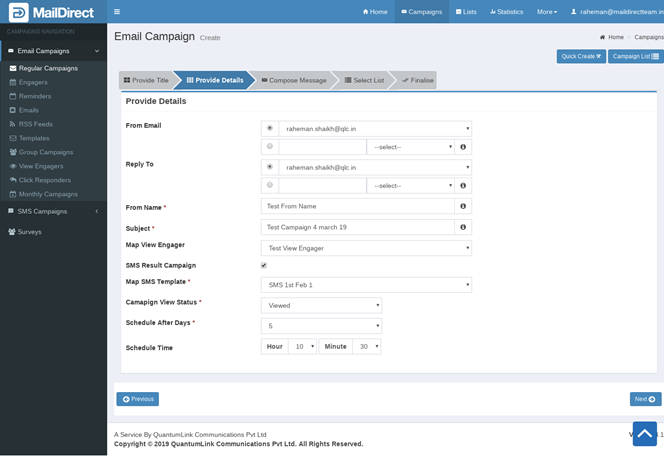
Figure : Creating New Campaign-Provide Details
Table : Campaign Send Details
|
Field |
Description |
|
From Email |
Type an appropriate email ID from which the campaign will be sent This field is mandatory |
|
Reply To |
Type an appropriate email ID to which all the replies for the campaign will be received This field is mandatory |
|
From Name |
Type an appropriate sender name This field is not mandatory |
|
Subject |
Type an appropriate subject line for the campaign This field is mandatory |
|
White Label Unsubscribe Page |
Select logo for Unsubscribe Page |
|
Map View Engager |
Select View Engager to map in email campaign |
If SMS Direct Service is active, Mail Direct provides the option to Create/Send Result Based Campaign based on Viewed Status i.e. Viewed or Not Viewed. The SMS Result based campaign is send to those recipients, who have Mobile Nos in the recipient list.
|
SMS Result Campaign |
The option to enable Email Sms Result Campaign. Check checkbox to map result based email SMS campaign details. On Checking the fields Map SMS Template, Campaign View Status, Schedule After Days and Schedule Time fields are displayed. |
|
Map SMS Template |
Select SMS Template, the message and sender details of the SMS Template will be applicable for the sending SMSs. |
|
Campaign View Status |
Select Campaign Status - Viewed and Not Viewed. i.e. Sms Result based campaign based on Viewed or Not Viewed |
|
Schedule After Days |
Select Schedule After Days. The SMS Campaign will be send after scheduled days. |
|
Schedule Time |
Select Schedule Time to send SMS campaign. |
- Enter the appropriate details in the required fields.
- Click the Next button.
- To compose a campaign message, MailDirect displays the Compose Message screen.