 MailDirect Help
Edit Lists
Edit List
To modify/edit a list:
- Click the edit
 button, which is a link in action section.
 - MailDirect displays the Edit Contact List screen.
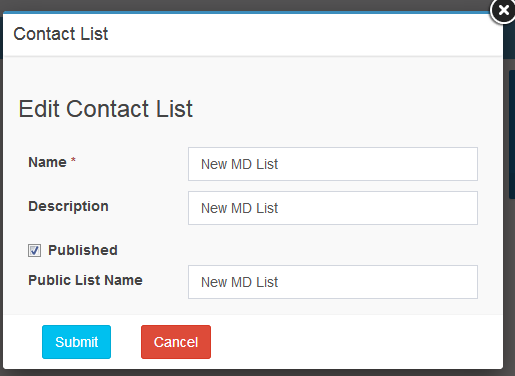
Figure : Edit Contact List
Note: When multiple lists are displayed in the search results, click the edit button from the list row and action column of the list to be edited.
Table : Editing a Contact List
|
Field |
Description |
|
Name |
Edit the name of the contact list as required . This Field is Mandatory. |
|
Description |
Edit the description of the contact list as required. This Field is not Mandatory |
|
Published |
Select /Clear the checkbox to enable /disable creation of a public name for the contact list. This Field is not Mandatory |
|
Public List Name |
Type /Edit the public name for the list as required. This field is mandatory if the Published check box is enabled. |
- Enter the appropriate details in the required fields, Click submit button.
- MailDirect displays the Contact List Management screen with the modified /revised list details.
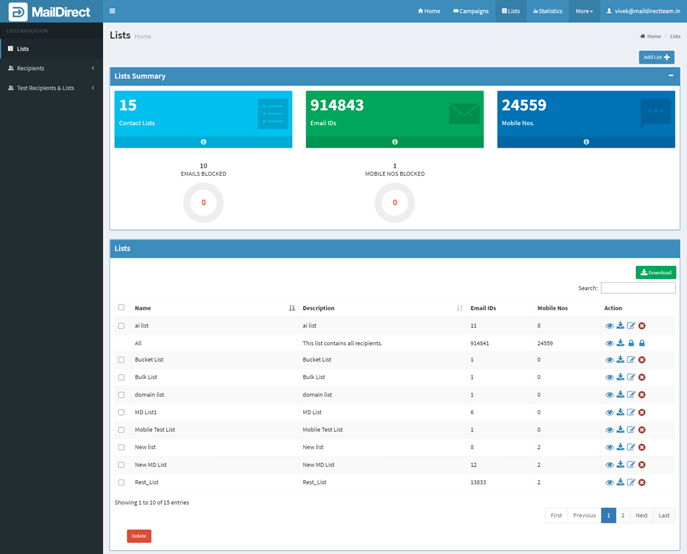
Figure : Contact Manage Lists with the Modified List