 MailDirect Help
Previous Survey
Previous Survey
To Import Designs from Previous Surveys using the Previous Survey link.
- Click the Previous Survey link on the Page Design screen.
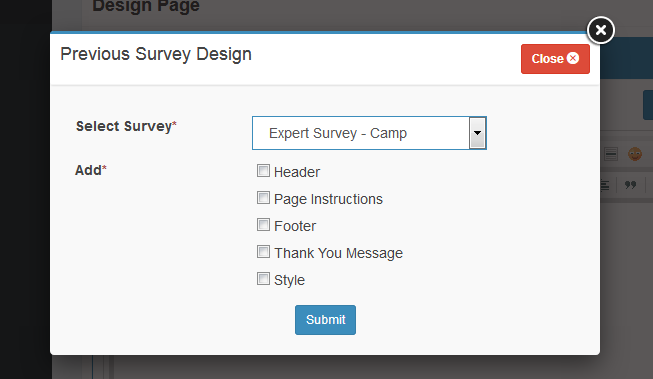
Figure : Previous Survey Design
Table : Get Page Design from Previous Survey
|
Field |
Description |
|
Select Survey |
Select an appropriate previous survey from which the page design is to be imported, from the drop -down list. On selecting the appropriate survey, other page design options will be made available, as shown in Figure – Previous Survey Design This field is mandatory. |
|
Add |
Select the appropriate check boxes to import the page design for the corresponding sections from the selected survey. The available options are explained below – Header: Select this check box to import the Header from the selected survey. Page Instructions: Select this check box to import the page instructions from the selected survey. Footer: Select this check box to import the footer from the selected survey. Thank You Message: Select this check box to import the thank you message from the selected survey. Style: Select this check box to import the style from the selected survey. |
- Select the appropriate details in the required fields.
- Click the Submit button.
- Mail Direct update the Page Design screen with the Header, Page Instructions, Layout, footer and thank you message tabs
- Click the
 Next button and Finalize page will appear.