 MailDirect Help
RSS Feed Wizard – Map Emails
RSS Feed Wizard – Map Emails
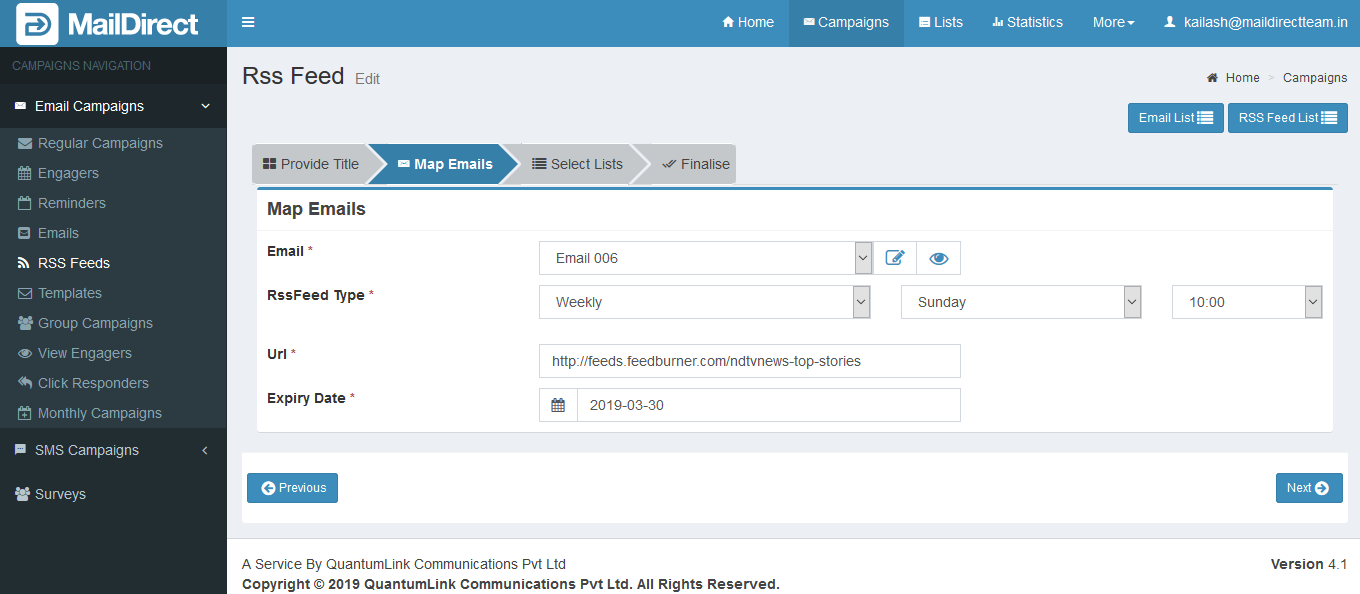
Figure : Create RSS Feed - Map Emails
Table : Create RSS Feed - Map Emails
|
Field |
Description |
|
|
This section displays drop down field of the email campaign list to be select. The When click on On clicking of Email Preview link, displays preview of Email message. On clicking of Email Details link, displays Email Details page where User can View and Edit email information. |
|
RSS Feed Type |
This section displays drop - down of RSS- feed type to be selected. Daily – send RSS Feed daily from start date and Time selected. Weekly – send RSS Feed weekly from start date and day selected. Monthly – send RSS Feed every month from start date and month date selected. |
|
Url |
This section displays to insert proper RSS Feed Url to send using campaign. |
|
Expiry Date |
This section displays expiry date for RSS Feed created. |


- Select/fill the appropriate details in the required fields.
- Click on next button
Mail Direct displays the RSS Feed Campaign Wizard List Map screen.